Linear optimization iteration to seed one planned bulk order bucket column as part of a basic Excel factory ordering plan. 2019
Christopher Clayton
01/13/2019
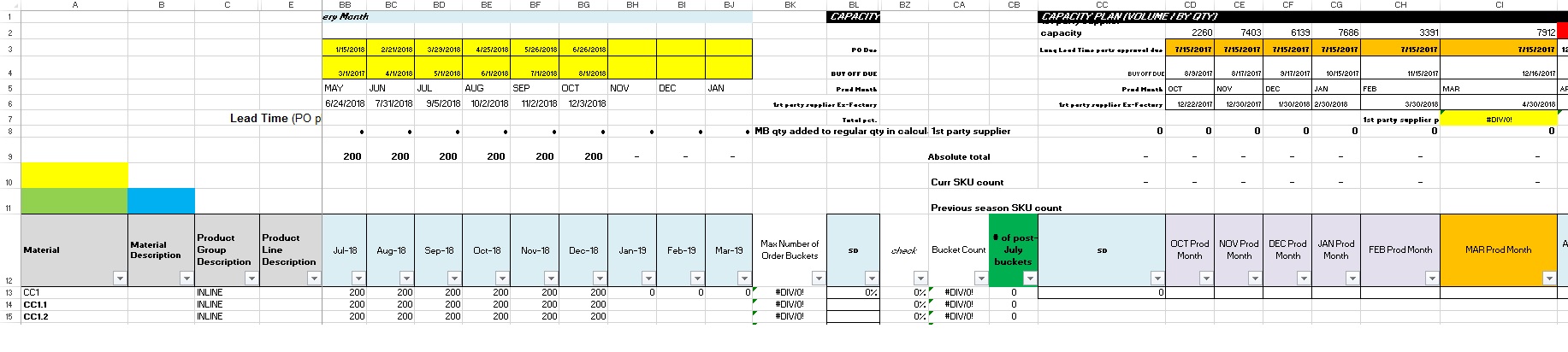
In this example, seed column CI with an initial order quantity plan based on an initial purchasing weight for each model, and an initial tolerance to go over-capacity (row 2 value).
If one good match is found, store it and modify the step values to find a better potential optimization between capacity and forecasted demand in columns BB through BG.
Improvement would be to exclude models that already have defined, solid customer needs that will not change by using an ignore list, and manually define their planned purchase quantities in the capacity bucket under analysis.
Sub optimizeOneBucket()

Dim startRow As Integer
Dim currRow As Integer
Dim bucketColumn As Integer
Dim bucketCapacity As Integer
Dim demandFulfillmentColumn As Integer
Dim maxNegativeDemandFulfillment As Integer
Dim maxOverCapacity As Integer
Dim percentForecastPurchaseWeight As Integer
Dim globalQuantityStepDown As Integer
Dim localStep As Integer
Dim forecastColumn As Integer
Dim optimizedCheck As Boolean
Dim totalOrder As Integer
Dim passOnce As Boolean
Dim currPositiveOrderVsCapacityDifference As Integer


'This is set up to meet a certain threshold for lack of demand fulfillment on the first pass, then it allows increases or decreases to total over-capacity in order to meet that regime. So it won't optimize between over-capacity and negative demand fulfillment, but I added notes below on how to potentially do that.


startRow = 13
currRow = startRow
bucketColumn = 89
bucketCapacity = ThisWorkbook.Sheets(3).Cells(2, bucketColumn)
demandFulfillmentColumn = 100
currMaxNegativeDemandFulfillment = -100
currMaxOverCapacity = 500
percentForecastPurchaseWeight = 0.5
globalQuantityStepDown = 0
localStep = 0
forecastColumn = 45
optimizedCheck = False
passOnce = False
totalOrder = 0


While optimizedCheck = False

    While ThisWorkbook.Sheets(3).Cells(currRow, 1) <> 0

        ThisWorkbook.Sheets(3).Cells(currRow, bucketColumn) = ThisWorkbook.Sheets(3).Cells(currRow, forecastColumn) * percentForecastPurchaseRate - globalQuantityStepDown 'If the first attempt at adding quantity without trying to do another pass to meet capacity, no global step down will occur. Currently not using globalStepDown though, rather using increases or decreases to total capacity allowance for the global optimization

        While ThisWorkbook.Sheets(3).Cells(currRow, demandFulfillmentColumn) < currMaxNegativeDemandFulfillment 'local step up required if the first order calculation cannot meet the minimum negative fulfillment value for the local item code optimization

          localStep = localStep + 10 'So this is set up to increase the local item code order if the minimum negative demand fulfillment allowance is not being met. However, later if all of these local increases causes the total order to exceed the capacity + over-capacity allowance, the program only knows to try increasing the max allowable over-capacity. There's no way to choose whether it's better to increase the local order, or increase the negative demand allowance in this part of the program.
          'So right now this will optimize the order to meet a certain global negative demand allowance, and fudge the capacity to make it work within the closest 100 units. Or this can be done in the other direction where a global step-down subtraction has to be used after the first pass until the total order is lower than total capacity, but this would not allow for local optimizations so the total order and capacity would have a bigger difference between them than under this method.
          'If the results of optimizing for local demand and increasing capacity are not totally desireable, then the whole program can be re-run with a different threshold for negative demand fulfillment allowed or cells can be manually adjusted by that point. This would just be to get an idea of what the factory would have to do to accommodate orders to meet a certain fulfillment regime. In this case, that's number of units worth of negative fulfillment according to ex-factory date + 30 days compared to the in-country request date (so the demandFulfillmentColumn is that difference as calculated by the Excel formula)
          'If this were to be done instead by strictly staying within the global maximum (capacity) by modifying the local minimums, then I'd think constructing an order that meets the demand needs should be done first and specific item code order quantities can be adjusted, and the goal would be to obtain the lowest weighted average demand fulfillment across all item codes while staying within the global capacity limit. I didn't think about using weighted average before writing this program, but to put emphasis on the local variables some sort of single-value comparison still needs to be done at the end of the program so it can evaluate whether to do more passes. In this case, it would still need to stop as soon as it begins finding a worse weighted average than before but that may not yield the best solution.
          'I guess trying to minimize the weighted average negative demand fulfillment compared to minimizing total over-capacity could be optimized by coming up with a single benchmark number which takes those two as inputs that can then be checked, and can be further minimized with ongoing iterations. Then that minimized number (after all the iterations are complete) would represent the best solution, for a particular order bucket, for taking balanced risk in both categories. However the question is what number to use. A ratio might work but they're not the same kind of number, so having the absolute balance be equal to 1 (same numerator and denomintor) may not make sense.
          'For risk percentage, going over-capacity is easy to find because it's merely the current over-capacity number divided by stated capacity. Then the weighted average lack of fulfillment could be divided by the total weighted average demand that needs to come in by that time in order to get that risk percentage. So getting those two percentages equal to each other may be one way to represent that a balance of risk has been achieved, and the program can then be made to either increase or decrease the over-capacity allowed, or increase or decrease the negative demand allowed on subsequent passes in order to achieve this.

          'However, the ratio between over-capacity and total capacity might not be able to go very high in practice before the actual risk of the factory simply being unable to produce it anytime soon gets really high, and the ratio of weighted average negative demand fulfillment versus total weighted average demand is a fuzzy number because of the inherent nature of forecasting well ahead of time for push production. So this may not be any more accurate than simply optimizing for a target negative demand fulfillment that seems to work for that category based on experience as to when retailers actually demand manufactured goods in practice. Whereas going over-capacity has immediate affects, and isn't so much a fuzzy risk even if the factory can ramp up labor to some extent. Having a feel for how far above capacity a vendor can go in practice to better define where the real maximum capacity cut-off lies is thus part of it as well.
          'So getting the ratio of negative demand over total demand, and over-capacity versus total capacity, around equal doesn't mean it's 'balanced' due to the social factors of a factory's labor force and of market forces that the consumer-side sales people and forecasters are contending with. However I'd say capacity is the much less fuzzy number, but this particular program puts demand first and then it has to be re-run multiple times with a different 'negative maximum demand allowance' if it results in too much over-capacity in actual practice.


          'The next more advanced step would be to store the final percent purchase multiplier values (after all the step changes have been made) so the program can use that to start with in other situations. However this would only be worth-while for big situations and a database would need to be used, probably not something best used in combination with the VB environment.

          ThisWorkbook.Sheets(3).Cells(currRow, bucketColumn) = ThisWorkbook.Sheets(3).Cells(currRow, forecastColumn) * percentForecastPurchaseRate - globalQuantityStepDown + localStep


        Wend

        totalOrder = totalOrder + ThisWorkbook.Sheets(3).Cells(currRow, bucketColumn)

        localStep = 0
        currRow = currRow + 1

    Wend

    currRow = startRow 'reset the starting row in case another pass at constructing the order needs to be done due to global variable limits being exceeded, or if there is room to loosen the global maximum limit

    If totalOrder > bucketCapacity + maxOverCapacity Then

        optimizedCheck = False
        maxOverCapacity = maxOverCapacity + 500 'try constructing the order again with a higher max over-capacity to meet the demand needs

    End If


    If totalOrder < bucketCapacity + maxOverCapacity And passOnce = False Then

        currPositiveOrderVsCapacityDifference = bucketCapacity + maxOverCapacity - totalOrder
        optimizedCheck = False
        passOnce = True
        maxOverCapacity = maxOverCapacity - 100 'test if we can improve the optimization now that we have one result which satiates the global capacity constraint while meeting local demand requirements

    End If

    If totalOrder < bucketCapacity + maxOverCapacity And passOnce = True Then

        If bucketCapacity + maxOverCapacity - totalOrder > currPositiveOrderVsCapacityDifference Then

            optimizedCheck = True 'if the new positive difference is worse than the previously stored positive difference, we're finished

        End If

        If bucketCapacity + maxOverCapacity - totalOrder < currPositiveOrderVsCapacityDifference Then

            optimizedCheck = False
            currPositiveOrderVsCapacityDifference = bucketCapacity + maxOverCapacity - totalOrder
            maxOverCapacity = maxOverCapacity - 100 'If the current positive difference between total order and capacity is smaller than the previous recorded difference, this is an improvement so try constructing the order again with an even smaller capacity value

        End If

    End If

Wend

End Sub